


Lead response time is the single biggest factor most businesses overlook when it comes to turning inquiries into customers — and right now, there’s probably a lead sitting in your inbox proving the point. Maybe it came in an hour ago. Maybe it came in yesterday. Either way, someone else may have already gotten to them first.
Speed isn’t just a nice-to-have here — it’s arguably the single biggest lever you can pull for conversion, and it’s one almost nobody pulls well. This guide walks through why lead response time matters so much, what actually needs to happen in the first 60 seconds, and exactly how to build it — with real message examples you can copy today.
Why Lead Response Time Matters More Than You Think
The data on this is old, well-replicated, and still routinely ignored.
The foundational research comes from a Harvard Business Review study, later reinforced by MIT and InsideSales.com: companies that respond to a new lead within five minutes are roughly 100 times more likely to actually make contact, and about 21 times more likely to qualify the lead, compared to waiting 30 minutes. The decay isn’t gradual either — the odds of qualifying a lead drop roughly tenfold between the five-minute mark and the ten-minute mark alone.
Phone data tells the same story from a different angle: Velocify’s analysis of millions of leads found that calling within one minute of an inquiry lifts conversion by around 391% compared to calling after two minutes. Two minutes. Not two hours.
And yet, most businesses aren’t even close. A Harvard Business Review audit of over 2,000 U.S. companies found that nearly a quarter never responded to leads at all, and across industries, the average lead response time sits around 47 hours — with legal services averaging roughly a full day and real estate averaging closer to six hours. Meanwhile buyer patience is shrinking, not growing: Salesforce’s State of Sales research found that 64% of consumers now expect a real-time response, up from 58% just a couple of years earlier.
Put plainly: the business that replies first usually wins, and “first” increasingly means now, not “by end of day.”
What Actually Has to Happen in 60 Seconds
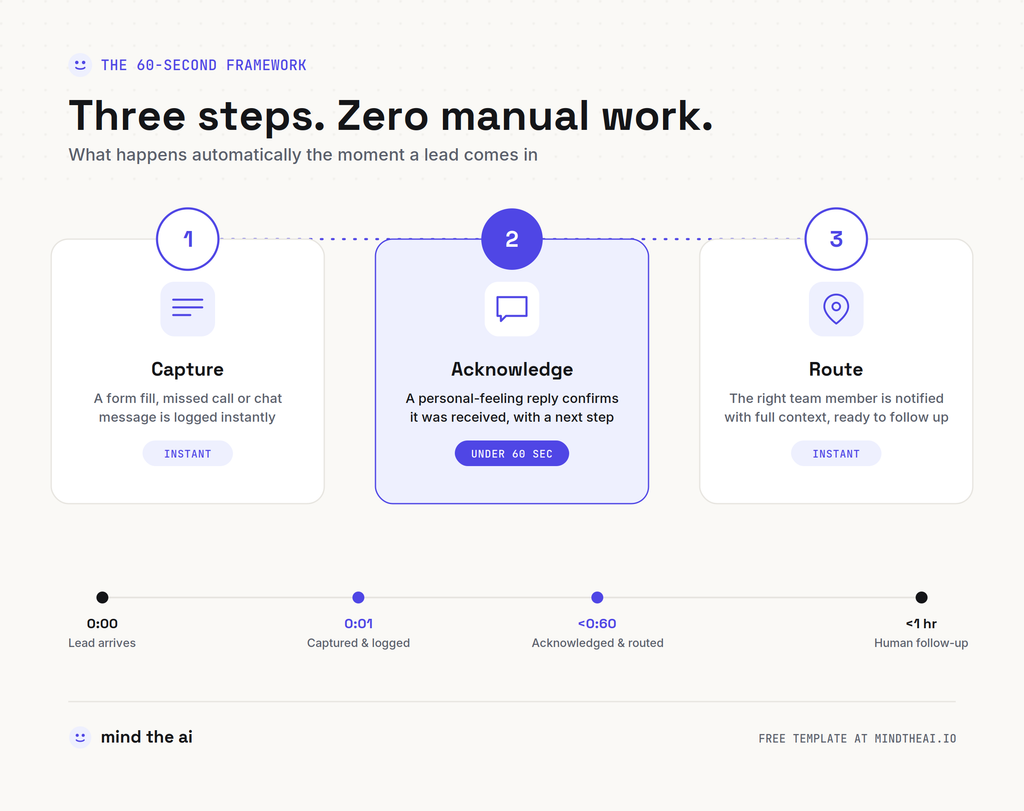
Nobody is claiming your team should be glued to their inbox refreshing it. That’s not realistic, and it’s not the point. Getting your lead response time under a minute isn’t about a person typing fast — it’s a system doing three things automatically, the moment a lead comes in:
1. Capture — the enquiry (form submission, missed call, chat message) lands somewhere structured immediately, not sitting in an inbox waiting to be noticed.
2. Acknowledge — the lead gets an instant, personal-feeling response confirming they’ve been heard and telling them what happens next.
3. Route — the right person on your team gets notified with enough context to follow up meaningfully, fast.
Only step 2 needs to happen in the first 60 seconds. Steps 1 and 3 can — and should — happen in the same instant, automatically, so your team’s human follow-up (the call, the tailored email) can land within the hour while the lead is still warm.
Three Acknowledgment Messages That Actually Work
The instant reply isn’t just a placeholder — it’s doing real work. A good one confirms receipt, sets a clear expectation, and gives the lead an easy next step. Here’s what that looks like across a few different businesses:
A law firm, replying to a website enquiry:
“Thanks for reaching out to [Firm Name]. We’ve received your message about [inquiry type], and someone from our team will call you within the hour. If it’s urgent, you can reach us directly at [phone number].”
A real estate agent, replying to a listing enquiry:
“Hi [Name], thanks for your interest in [property address]! I’m free today if you’d like a quick call or want to see it in person this week — here’s my calendar: [booking link].”
An agency, replying to a missed call:
“Hey — sorry we missed your call! I’ll ring you back shortly, but in the meantime, here are the 2 things that’d help me prep: [short qualifying question]. Talk soon.”
Notice what these have in common: they’re short, they name a concrete next step, and they don’t pretend to be a full conversation. Their only job is to buy you the next hour without losing the lead’s attention.
A Simple Workflow That Fixes Your Lead Response Time
This is where automation earns its keep — this exact sequence can run without anyone lifting a finger:
“` New enquiry (form, call, or chat) ↓ Auto-qualify & log to CRM ↓ Instant SMS/email reply sent (the acknowledgment above) ↓ Team notified with lead context, ready for follow-up “`
Built in a tool like n8n, Make, or Zapier, this typically takes under an hour to set up: a trigger (form submission, missed call, or new chat message), a lookup/qualification step, a templated message send, and a notification to whoever owns follow-up. It runs the same way every time, at 2pm on a Tuesday or 11pm on a Sunday — which matters, because leads don’t only show up during business hours.
(If you’d rather not build this from scratch, this is exactly what our free Speed-to-Lead Intake template does — download it, plug in your CRM and phone/email provider, and it’s live.)
Common Mistakes That Quietly Kill Your Lead Response Time
Treating the auto-reply as “close enough.” An instant reply is a bridge to a human follow-up, not a replacement for one. If nobody actually calls within the hour, you’ve just automated the appearance of responsiveness — the lead notices the difference.
Making the reply generic. “We received your message and will respond within 2 business days” is technically an instant reply, and it’s also a great way to lose the lead anyway. Specificity (a timeframe, a name, a next step) is what makes it feel human.
Forgetting after-hours and weekends. A huge share of leads come in outside business hours. If your speed-to-lead system only runs 9-to-5, you’re still losing the leads that matter most — the ones who reached out at 9pm because they finally had time to think about it.
Routing to “the team” instead of a person. A notification that goes to a shared inbox often means everyone assumes someone else will handle it. Route to one clearly responsible person (or a rotation), not a group.
The Takeaway
Improving your lead response time is one of the few growth levers that costs almost nothing and doesn’t require more leads, a bigger budget, or a better pitch — just faster acknowledgment of the ones you already have. The data is consistent across a decade of research: the businesses that show up first, win first.
The good news is you don’t need to hire someone to sit by the phone. You need a system that fires the moment a lead arrives — and that’s a weekend project, not a quarter-long one.
Want the ready-built version of this? Grab the free Speed-to-Lead Intake template — it’s the exact workflow described above, ready to import into n8n, with setup instructions included.
Leave a Reply